Showing posts with label Oracle. Show all posts

Tuesday, February 1, 2011

ODI 11g Upgrade issues - Set operator disabled

In this post, I will be consolidating all the issues that I had with an ODI 11g upgrade from ODI 10g. This is strictly valid for ODI 11g instances which have been migrated from ODI 10g.

1.)
During the upgrade from 10g to 11g the upgrade, if you forget to upgrade the Technologies, you will find that the SET based functionality doesnt work. Thanks to Nicolas for pointing this out.
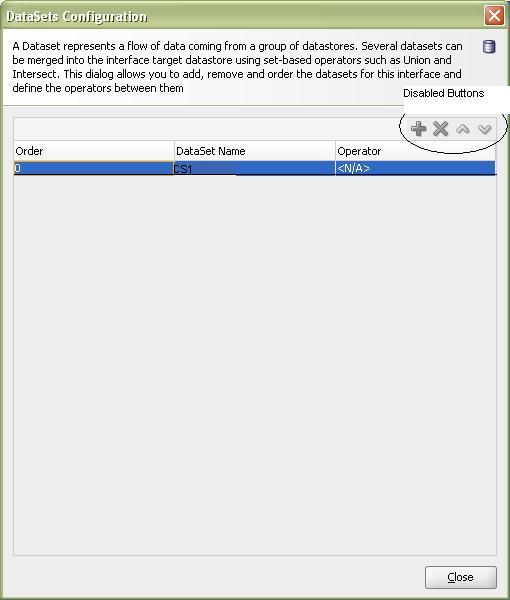
In an interface mapping, you cannot add multiple datasets. The Add/Delete buttons for the datasets are disabled.


The cause -
The Oracle Technology was not upgraded to support these new features. So, you will see the following in the Topology Manager -> Physical Architecture -> Technologies -> Oracle
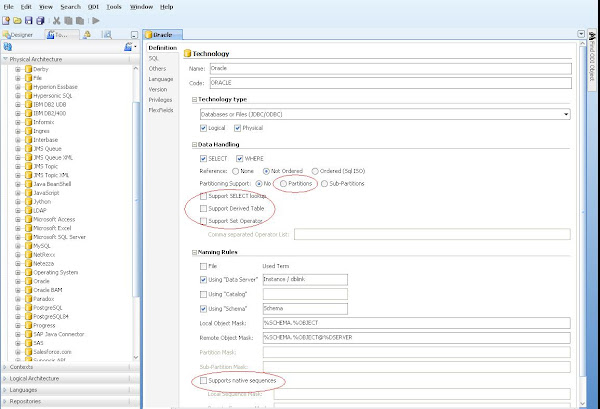

The options highlighted above are unchecked. Hence, the functionalities of Partitioning, Native Sequences, Lookups, Derived Tables and Set operators is not available.

Solution -
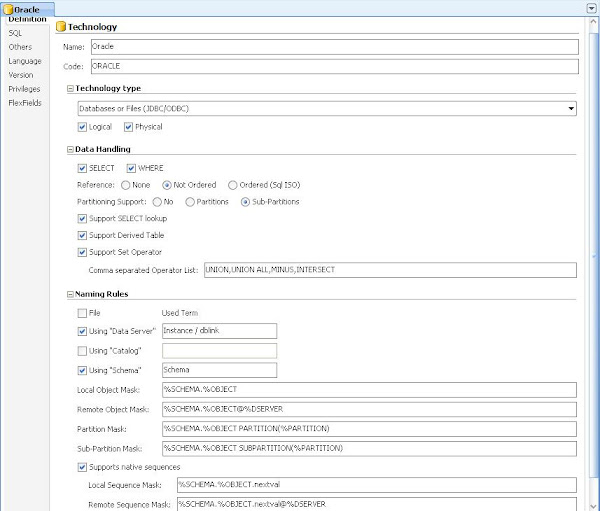
You will need to make changes to the Oracle Technology as follows:

Friday, September 17, 2010

Call Java JAR methods from ODI

Several times we will see the need of invoking custom Java programs from ODI. Uli has written an excellent article on this.
This is a good solution for the development environment.
However, the limitation of this approach lies in the fact that mandates the need to copy the Jar file to the drivers directory of ODI.
This also needs the agent to be bounced each time a new jar is added.
Think of a scenario where Java agnostic developers wish to use ODI. This is a maintenance overhead for an ODI administrator and also will clutter up the ODI drivers directory. In my opinion, the ODI drivers directory should be used only for Database drivers or application adaptors.

Any custom java code should be used in the following way:

import os
import sys

jars = [
    "/home/users/ankit/java/MyFileWrite.jar"
    ]

for jar in jars:
   sys.path.append(jar)

from com.mycompany.MyFileWrite import *

fw=MyFileWrite()
fw.writeFile()


Monday, August 30, 2010

ODI Object versioning

Versioning in ODI is a less covered topic.
Lets look today at how ODI handles object versioning. If you recall from the ODI repository architecture diagrams, ODI stores Topology, Security and Versioning information in the Master Repository.
Each time an ODI object (Project, Model, Datastore, etc) is versioned, it is saved in the Master Repository.

Eg. If we version the package - PKG_ODI_PROCESS as follows:


Then, in ODI_MASTER_REPOSITORY, we can see that there are 2 new records added to the SNP_VERSION table. The following query can be used:

SELECT i_instance, ext_version, i_data, instance_name
FROM snp_version
WHERE 1 = 1
and instance_name LIKE 'PKG_ODI_PROCESS'

In here,
I_INSTANCE is the Internal ID of the object in the work repository
EXT_VERSION is the 1.0.0.1 notation version assigned to the object
I_DATA is the FK into SNP_DATA table that stores the versioned object
INSTANCE_NAME is the name of the object itself at the time of being versioned

SNP_VERSION works alongwith SNP_DATA to store the actual versioned object. We can get that information using the following query:
SELECT sv.i_instance,
sv.i_objects,
sv.ext_version,
sv.i_data,
sv.instance_name,
sd.data_contents
FROM snp_version sv, snp_data sd
WHERE 1 = 1
and sv.i_data = sd.i_data
and
instance_name LIKE 'PKG_ODI_PROCESS'

The DATA_CONTENTS column is of type LONG_RAW and stores the versioned object in a compressed LZW compression form (Unix compress command)

We can save the contents of SNP_DATA.DATA_CONTENTS into an Operating System file named as pkg_odi_process.Z, though we can name it whatever we wish with a .Z extension.
Uncompress this file using Unix uncompress or Windows Winzip, WinRar.
The file that you get by uncompressing, should be given a .xml extension.
The resulting pkg_odi_process.xml file is the same file as if we would had exported the package PKG_ODI_PROCESS using Export command in the Designer module into an XML file.

This file can be used to import back to the Work Repository.

Tuesday, June 29, 2010

Odi Load Multiple XML Files

Loading multiple XML files into Oracle using ODI is illustrated in this post.

The standard reverse engineering driver will parse the dtd or if the dtd is not available, it will parse the XML and generate a DTD on the fly in the same location where the XML file exists.

To load multiple XML files we will have to employ ODI variables. An ODI variable is needed to store the name of the file that needs to be loaded to Oracle.
Declare the variable in your project V_MYXMLFILE with the following query:
select xmlfilename from my_metadata_table.

This my_metadata_table should exist in an Oracle schema and should contain a column xmlfilename which lists all the XML filenames (alongwith path).
Each time the variable is refreshed, it will populate the first value from the table. You can follow the instructions found at http://odiexperts.com/?p=524 to loop through each row in the table.

Now create 2 ODI procedures:
  1. Truncate XML Schema
  2. Load XML Schema
1.) Truncate XML Schema will contain 1 command "Truncate"

Technology = XML and Schema = Logical XML schema that you want to work on.
The "Command on Target" will be "TRUNCATE SCHEMA MYSCHEMA".
Here MYSCHEMA is the name of the XML schema that is defined in Topology Manager using the s tag as in
jdbc:snps:xml?d=E:/XMLDIR/myXML.dtd&s=MYSCHEMA

Truncate XML Schema will wipe out all the records in the data structure that holds the XML data. It can be in memory or it can be set to a physical database schema by using &db_props=mydbparams parameter in the xml server definition. Here mydbparams is a reference to a physical file mydbparams.properties created in the $ODI_HOME/oracledi/drivers.

2.) Load XML Schema will contain 2 commands:

Show variable value - This will be created using Jython Technology with the following commands :
a = 'Filename = '+ '#V_MYXMLFILE'
raise(a)
Also, mark the Ignore Errors = Yes, for this step.

This is cheat to display the value of the ODI variable during execution in the Operator.
Also, this step is somehow needed so that the value of the variable can be accessed by the next step.
If you remove this step, the next step (which actually loads the XML schema with the contents of the file) errors out.

Load XML Schema
- This will be created using XML Technology and XML logical schema.
Command on Target = LOAD FILE "#MYPROJECT_NAME.V_MYXMLFILE" ON SCHEMA MYSCHEMA INSERT_ONLY


Now you can create a package using these procedures and refresh the variable V_MYXMLFILE with location/name of the file and execute Load XML Schema.
The procedure "Load XML Schema" can also be executed in a loop to load multiple XML files (that adhere to the same DTD) into the database tables.


Friday, April 16, 2010

ODI variables from Work Repository

Ever thought if there was an SQL way of accessing the values of the variables that were evaluated or refreshed by ODI sessions ?

ODI stores the information about the variables in the following tables in a Development WR:

SNP_VAR
SNP_VAR_DATA (historical values of variable)
SNP_VAR_SCEN
SNP_VAR_SESS


The following query will extract the variable value for a particular session:

SELECT svd.var_name,
       svd.var_n AS numval,
       svd.var_d AS dateval,
       svd.var_v AS strval
FROM snp_var_data svd,
     (SELECT sp.project_code || '.' || sv.var_name AS fullvarname
      FROM snp_project sp, snp_var sv
      WHERE sv.i_project = sp.i_project) svp,
     snp_var_sess svs
WHERE     svd.var_name = svp.fullvarname
      AND svs.var_name = svd.var_name
      AND svs.sess_no = :sess_no

The Execution WR would be a bit different


Wednesday, March 17, 2010

LKM File to Oracle SQLLDR ODI

One of the most common problem people are facing while using Oracle Data Integrator's LKM File to Oracle (SQLLDR) is that the step which invokes the OS based sqlldr results in an error even if LOA_ERRORS is set to non-zero number.

For eg. you have a file that contains 1000 records and 10 of them are erroneous (bad), then ODI will create a .bad file and move the records in there. Theoretically, you will expect that setting up the LKM parameter LOA_ERRORS should solve the problem. So, if you want a maximum of 20 records to error out, you will set LOA_ERRORS=20.
But, even if the number of actual errors is less than 20, ODI will indicate failure of that step.

This is a known bug 8560194 with ODI LKM File to Oracle (SQLLDR) and it has not been resolved yet.
Lets get into the details as to why this is a bug. This has to do with the way sqlldr returns the code when it terminates. Following is the list of codes that sqlldr returns for different conditions:
  1. SQLLDR if successful returns 0
  2. SQLLDR if unsuccessful returns 1
  3. SQLLDR if successful but even 1 record erred out to .bad or .dsc file returns 2
For ODI anything that is not 0 is an error. And that will be true for any system that is dependent on the return codes

To resolve this bug, you will have to customize this KM and change the step "Invoke SQLLDR" to selectively handle each error condition.
Follow the steps:
  1. Duplicate the KM.
  2. Goto the step Call sqlldr. and change the technology to Jython.
  3. Replace the existing code with the following:
import os
retVal = os.system(r'sqlldr control=<%=snpRef.getSrcTablesList("", "[WORK_SCHEMA]/[TABLE_NAME].ctl", "", "")%> log=<%=snpRef.getSrcTablesList("", "[WORK_SCHEMA]/[TABLE_NAME].log", "", "")%> userid=<%=snpRef.getInfo("DEST_USER_NAME")%>/<%=snpRef.getInfo("DEST_PASS")%>@<%=snpRef.getInfo("DEST_DSERV_NAME")%> > <%=snpRef.getSrcTablesList("", "[WORK_SCHEMA]/[TABLE_NAME].out", "", "")%>')

if retVal == 1 or retVal > 2:
----->
raise 'SQLLDR failed. Please check the <%=snpRef.getSrcTablesList("", "[WORK_SCHEMA]/[TABLE_NAME].log", "", "")%> for details '

Replace the -----> with spaces or tab. You can enhance the above code by putting variables and further checking for the .bad, .dsc and .log files.


Tuesday, November 24, 2009

IKM Oracle Data Integrator SCD Type 2 Bug

Oracle Data Integrator 10.1.3.5
IKM Slowly Changing Dimension Type 2

Problem Statement:

Implement a SCD Type 2 for a table.
Three columns form the Natural Key for the table and all other columns need to be tracked for change.
If the non Natural Key columns were marked as “Overwrite On Change” in the “Slowly Changing Dimensions Behaviour”, the IKM worked fine but if the non Natural Key columns were marked as “Add Row on Change”, the IKM didn’t do anything.

This is a reported bug no. 8312924 and a patch is available. Metalink note 788747.1 describes the problem and workaround if you cannot deploy the patch.

Solution:

Changed the IKM Step 172 and replaced CX_COL_NAME with EXPRESSION courtesy of forums:

http://forums.oracle.com/forums/thread.jspa?messageID=3816462
and
http://forums.oracle.com/forums/thread.jspa?messageID=3631382&#3631382

Tuesday, October 27, 2009

Windows Oracle Apex upgrade on XE from 2.2 to 3.2

I was tempted to upgrade my Apex installation to 3.2 from default (2.2) that comes along with Oracle XE database.
I followed the instructions on
http://www.oracle.com/technology/products/database/application_express/html/3.2_and_xe.html
and
http://blogs.oracle.com/SanthoshK/2008/09/oracle_xe_apex_3x_installation.html

But finally got struck during the step of loading images. I had kept the APEX install on D:

SQL> @apxldimg.sql D:\Downloads\Oracle_Tools\apex_3.2

PL/SQL procedure successfully completed.

old   1: create directory APEX_IMAGES as '&1/apex/images'
new   1: create directory APEX_IMAGES as 'D:\Downloads\Oracle_Tools\apex_3.2/apex/images'

Directory created.

declare
*
ERROR at line 1:
ORA-22288: file or LOB operation FILEOPEN failed
Access is denied.
ORA-06512: at "SYS.DBMS_LOB", line 523
ORA-06512: at "SYS.XMLTYPE", line 287
ORA-06512: at line 15


I tried several alternatives like changing the apxldimg.sql script and googled atleast 2 hours before trying a simple solution.

I copied the apex installation folder from D: drive to
C:\apex_32 and reran the step

SQL> @apxldimg.sql c:\apex_32

PL/SQL procedure successfully completed.

old   1: create directory APEX_IMAGES as '&1/apex/images'
new   1: create directory APEX_IMAGES as 'c:\apex_32/apex/images'

Directory created.
PL/SQL procedure successfully completed.
Commit complete.

timing for: Load Images
Elapsed: 00:01:01.59

Directory dropped.

Now I can see all the images on http://localhost:8080/apex
Apparently, there are quirks involving any other drive than C: that need to be resolved by Oracle. But for the time this is the quickest way to resolve and enjoy the functionalities of Apex 3.2

Thursday, February 5, 2009

Step by Step guide to Install Oracle 11g on Ubuntu VM

After downloading the Ubuntu VMWare image, there were few more quirks to settle.
I had to install NFS and SSH on the machine to make it accessible by ssh from Windows.

Following are the commands:
sudo apt-get install openssh-server openssh-client

sudo apt-get install nfs-kernel-server nfs-common portmap

One of the forums that helped were:
http://ubuntuforums.org/archive/index.php/t-492772.html

Now I setup the samba share on this machine
sudo aptitude install samba
https://help.ubuntu.com/community/SettingUpSamba

After installing the samba, create a directory on the FS which you want to share with Windows or other systems.
Then edit /etc/samba/smb.conf and add these lines to the end

[share_name]
        comment = Share to Linux
        path = /home/user/winshare
        guest ok = yes
        writeable = yes


You can use the following commands to restart the services if needed:
/etc/init.d/nfs-common restart
/etc/init.d/samba restart


Following is a suggested helpful link:
http://www.howtogeek.com/howto/ubuntu/create-a-samba-user-on-ubuntu/

Process to install the Oracle on Ubuntu starts

This page is particularly helpful and is worth reading every bit:
http://www.pythian.com/blogs/654/installing-oracle-11g-on-ubuntu-linux-710-gutsy-gibbon

It mentions the packages that need to be updated before Oracle Installation.

apt-get update
apt-get upgrade
(This would update the packages from the internet and will take sometime)

Anyways follow step by step the instructions in the above link to complete the installation.

At some point of time, you will encounter insufficient disk space in Linux due to which you cannot install Oracle.
To add more disk space to the Linux VM, follow the link below
http://www.matttopper.com/?p=25

I allocated a 20GB SCSI HD to Linux VM and split it into 3 partitions. The FSTAB entries are:
/dev/sdb1 /u01 ext3 defaults 1 1
/dev/sdb2 /oradata ext3 defaults 1 1
/dev/sdb3 /data ext3 defaults 1 1


Also, the Oracle installer needs a GUI. So, you need an X-Server (like eXceed) to complete the installation.
Simply on command prompt, set DISPLAY

For bash- > export DISPLAY=ExceedHostIP:0.0

And then start Exceed on Windows and connect to the IP address of the VM linux. Try 3-4 times to connect as it may error out.

If you get a timeout error, ignore the message and press nothing. Continue with Installation and complete the post-installation steps in
http://www.pythian.com/blogs/654/installing-oracle-11g-on-ubuntu-linux-710-gutsy-gibbon

Good Luck

Tuesday, February 3, 2009

Installing APEX on Oracle 11g from Database Troubleshooting

I installed Oracle 11g on Oracle Linux from a VM Image. So I am good with Oracle Installation.

Now my interest is to use APEX on this database.

I followed the instructions on the following page:
http://download.oracle.com/docs/cd/E10513_01/doc/install.310/e10496/db_install.htm#CBHCDBAB

After the installation is complete and I tried to access
http://localhost:8080/apex/apex_admin, I kept getting username/password for xdb account.
I tried unlocking the account xdb and anonymous using
alter user xdb account unlock;
alter user anonymous account unlock;

It didnt work.

If it works for you then, you will be able to access the site. That site requires admin as username.
You will need to change the password for this user in the database by executing the following command:
sql> @apxxepwd.sql <admin123>
This command is found in $ORACLE_HOME/apex

Then I tried executing apex_epg_config script found in
/ora/db/11.1.0/apex

It asks for a parameter. This parameter should be /ora/db/11.1.0
eg.
sql> @apex_epg_config $ORACLE_HOME

It basically loads the apex images to the database. Instructions for executing this script is not well-documented.

But still the problem remains the same. I am not able to access the website.

Now I stop the listener.
$ lsnrctl stop

and then
$lsnrctl start

Copyright (c) 1991, 2007, Oracle. All rights reserved.

Starting /ora/db/11.1.0/bin/tnslsnr: please wait...

TNSLSNR for Linux: Version 11.1.0.6.0 - Production
System parameter file is /ora/db/11.1.0/network/admin/listener.ora
Log messages written to /ora/diag/tnslsnr/oracle2go/listener/alert/log.xml
Listening on: (DESCRIPTION=(ADDRESS=(PROTOCOL=tcp)(HOST=oracle2go.us.oracle.com)
(PORT=1521)))
Listening on: (DESCRIPTION=(ADDRESS=(PROTOCOL=ipc)(KEY=EXTPROC1521)))

Connecting to (DESCRIPTION=(ADDRESS=(PROTOCOL=TCP)(HOST=oracle2go.us.oracle.com)
(PORT=1521)))
STATUS of the LISTENER
------------------------
Alias LISTENER
Version TNSLSNR for Linux: Version 11.1.0.6.0 - Production
Start Date 03-FEB-2009 08:26:18
Uptime 0 days 0 hr. 0 min. 0 sec
Trace Level off
Security ON: Local OS Authentication
SNMP OFF
Listener Parameter File /ora/db/11.1.0/network/admin/listener.ora
Listener Log File /ora/diag/tnslsnr/oracle2go/listener/alert/log.xml
Listening Endpoints Summary...
(DESCRIPTION=(ADDRESS=(PROTOCOL=tcp)(HOST=oracle2go.us.oracle.com)(PORT=1521))
)
(DESCRIPTION=(ADDRESS=(PROTOCOL=ipc)(KEY=EXTPROC1521)))
The listener supports no services
The command completed successfully

Then waited for 5 minutes. Somehow it didnt work for me the next instant. I think it takes some time to refresh.

Now I can access the
http://localhost:8080/apex website.

The key is to restart the listener after unlocking the xdb account.

There is another page that I hit while searching for the solutions to APEX installation:
http://www.uaex.edu/srea/Application_Express_Installation.htm

Friday, September 26, 2008

Oracle Subquery bug - Test each subquery individually

Here arises the importance of unit testing each subquery individually. Consider the scenario below:

I have this code:

 DELETE FROM cfgview
        WHERE cfgviewid NOT IN (SELECT
cfgviewid
                                FROM vw_ext_acc_configview);


The inner subquery if executed alone, returns an error because the columnname cfgviewid doesn't exist.

But if you execute the full query, it returns successfully and deletes 0 rows.

So, this implies that you need to unit test each query before adding it as a subquery.

Tuesday, July 8, 2008

Oracle Enterprise Manager 10g Job Scheduler Configuration Problem Resolution for Solaris

Oracle Enterprise Manager 10g is a powerful tool that comes with many administrative features which make database management much more simpler.
It has an inbuilt job scheduler that lets you schedule jobs. Its not a very feature rich scheduler but still does quite a lot considering the fact that it is free with Oracle's License.

I am outlining a configuration problem that may save some time to diagnose:
If a shell script or a Java program is executed using OEM under the credentials of a user who doesnt belong to the Oracle user group on Solaris, it fails with the following error:

Shell script :

/bin/sh: cannot determine current directory
or

shell-init: could not get current directory: getcwd: cannot access parent directories: Permission denied

Java Proram :

Error occurred during initialization of VM
java.lang.Error: Properties init: Could not determine current working directory


This is due to permission lacking on the directory where the OEM agent is installed
/u01/app/oracle/product/agent10g/sysman/emd

Check the permissions on this directory.
drwxr-x--- 6 oracle dba 512 May 12 13:40 emd

Change the permissions to
drwxr-xr-x 6 oracle dba 512 May 12 13:40 emd

I believe that OEM's working directory is the above location and since the underlying user doesnt have access to this directory, hence all the programs error out.